
How to Sit in an Office Chair — The Correct Setup, Step by Step
Nobody is ever taught this. You get a desk, you get a chair, you sit down in whatever position it happens to be in, and eight years later your lower back hurts.
The chair almost certainly has three or four adjustments on it. Most people use one — height — and even that they set by eye. The rest of the levers stay untouched for the life of the chair.
Here's the thing worth understanding before any of the steps below: you adjust the chair to your body first, and then adjust the desk and monitor to the chair. Almost everyone does it backwards — they set the chair to whatever height makes their arms reach the desk, and their legs pay for it. Get the order right and half the problem solves itself.
The 60-second version
If you only do one pass, do this:
- Stand in front of the chair. Raise or lower the seat until the seat pan is level with the crease at the back of your knee.
- Sit down, slide all the way back until your back touches the backrest.
- Check that you can fit 2–3 fingers between the front edge of the seat and the back of your knee.
- Feet flat on the floor, knees at roughly 90 degrees. If your feet dangle, you need a footrest.
- Unlock the recline and set it to about 100–110 degrees — slightly open, not bolt upright.
- Drop the armrests until your shoulders are relaxed and your elbows sit at about 90 degrees.
- Now raise your monitor so the top edge is at eye level.
- Stand up every 30 minutes.
The detail on each step, and why it matters, is below.
Step 1: Set the seat height — from standing, not sitting
Do this before you sit down, because you can't judge it accurately from inside the chair.
Stand next to the chair and adjust the seat until the top of the seat pan is level with the crease at the back of your knee. Then sit. Your feet should be flat, your knees at roughly 90 degrees, and your thighs approximately parallel to the floor.
Why it matters more than anything else: if the seat is too high and your feet dangle, the weight of your legs pulls down on the front of your thighs and drags your pelvis into a backward roll. If the seat is too low and your knees sit higher than your hips, your pelvis rolls back even harder. Either way your lower back is forced to flatten and round, and the ache at 4pm follows.
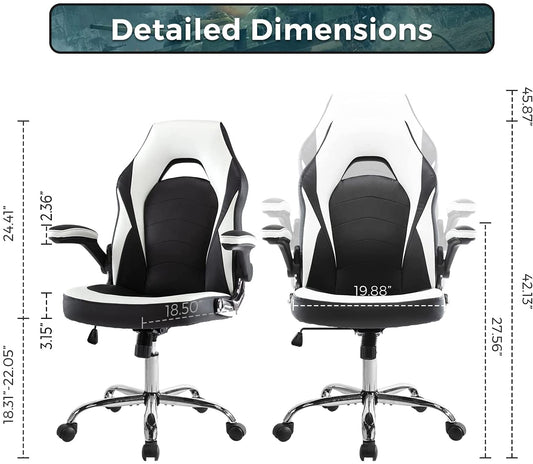
A chair that can't reach this position for you is the wrong chair. Usable office chairs should come down to around 400 mm at the lowest and offer at least 100 mm of travel — that's the range that lets the same model fit someone at 5'2" and someone at 6'.
[IMAGE: person setting seat height while standing beside the chair, knee crease line marked]
Step 2: Check the seat depth
Sit all the way back so your back is against the backrest. Now slide your fingers into the gap between the front edge of the seat and the back of your knee.
You want two to three fingers of clearance. About 5–7 cm.
Too much gap and you get no thigh support. Too little — or none — and the seat edge presses into the back of your knee, restricting circulation, and you'll instinctively slide forward to escape it. That slide is the problem. Once you're perched on the front third of the seat, your back can't reach the backrest, and you've turned a perfectly good chair into a stool.
This is the single most common fitting failure, and it's almost invisible. People assume they're bad at sitting up straight. They're not — the chair is too deep for their legs and their body is doing the only thing it can.
If your chair has a sliding seat, adjust it now. If it doesn't and the seat is too deep, a firm cushion behind your lower back closes the gap and works as a stopgap.
Step 3: Actually use the backrest
Sound obvious. Watch any office for ten minutes and count how many people are touching their backrest.
A backrest that isn't in contact with you does nothing. If you're leaning forward toward a screen, your spine is carrying your entire upper body weight — that's your muscles doing a job the chair was designed to do. If you find yourself drifting forward constantly, the cause is usually seat depth (Step 2) or a monitor that's too far away or too small to read comfortably (Step 7).
Step 4: Find the lumbar support
Your lower back curves inward. The chair should meet that curve.
The support should press gently against you at roughly belt level — not between your shoulder blades, not at your tailbone. If your chair has a height-adjustable lumbar section, slide it there. If it's a fixed contour, sit back and check whether it lands in the right place on your body. It's either right for your torso length or it isn't.
Quick test: sit back normally and slide your hand behind your lower back. If it passes through easily with room to spare, you have no effective lumbar support, and your spine is holding its own curve unassisted for eight hours a day.
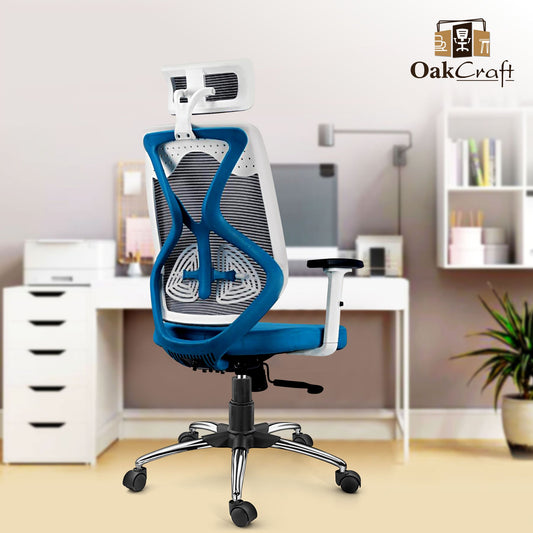
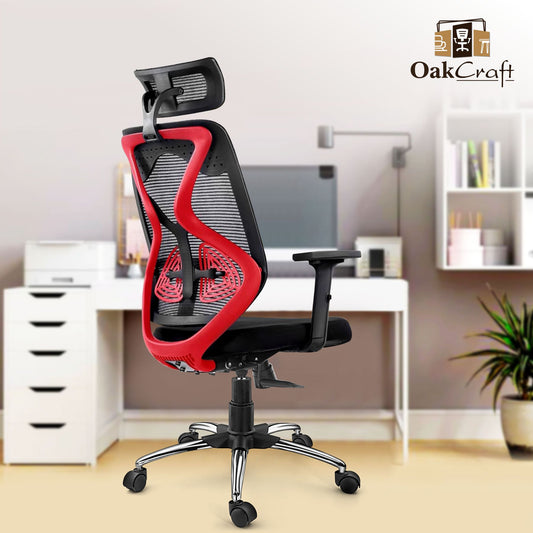
That gap is what a rolled-up towel fixes for free, and what a properly contoured backrest fixes permanently. Every chair in the Oakcraft office seating range is built with a defined lumbar contact point rather than a flat backrest panel — it's the difference between a backrest you lean on and one you actually get support from.
[IMAGE: side view showing correct lumbar contact at belt level vs. the gap — highest-value image on the page]
Step 5: Open the recline to 100–110 degrees
The 90-degree posture on every ergonomics poster is wrong, or at least outdated.
Leaning back slightly transfers a meaningful share of your upper body weight onto the backrest instead of down through your lumbar spine. Sitting rigidly upright means your trunk muscles hold you there all day, and they fatigue.
So: find the tilt lever, unlock it, lean back until you're at roughly 100–110 degrees between torso and thighs — noticeably open but not lounging — and lock it there. A centre-tilt mechanism with a lock lets you hold that angle instead of fighting it. If your chair has tension adjustment, set it so the backrest follows you when you move rather than pushing you forward.
If your chair only sits bolt upright with no recline at all, this step is unavailable to you, and that's a genuine reason to replace it.
Step 6: Drop the armrests
Let your arms hang loose at your sides, then bend your elbows to 90 degrees. That's the height your armrests should be.
Too high and you're shrugging your shoulders all day — a direct route to neck and upper trap pain. Too low and you'll lean onto one side to reach, which produces the classic one-sided back ache. Your forearms should rest lightly while typing without your shoulders rising or dropping.
If your armrests are fixed at the wrong height, you're better off ignoring them completely than half-using them. And if they hit the underside of your desk and stop you sitting close enough, that's a real problem — either the armrests come off or the desk gets raised.
Step 7: Now move the desk and screen to you
Only at this point do you look at the desk.
Monitor: top edge at roughly eye level, about an arm's length away (50–70 cm). If you're on a laptop, it is always too low, no exception — your head drops forward, and a head weighing 4–5 kg held forward multiplies the load through your neck and upper back. Your upper back rounds to compensate, your lower back rounds under that. A ₹500 laptop stand plus a separate keyboard fixes the whole chain.
Keyboard and mouse: close enough that your elbows stay near your body. Reaching forward pulls you off the backrest, which undoes Step 3.
Desk height: standard desks in India sit around 750 mm, which suits someone about 5'8". If yours is too tall and can't be changed, raise the chair to match the desk and put something under your feet — see Step 8.
Step 8: Add a footrest if your feet don't reach
If the desk forced you to raise the chair past your ideal seat height, your feet need a platform. A proper footrest, a ream of paper, a stack of old files — the material doesn't matter, the contact does. Feet flat on something is what keeps your pelvis from rolling back.
The step that undoes all the others
You can nail all eight steps and still ache, because no posture is sustainable for eight hours. Not this one, not any.
Hold any position long enough and the muscles holding you there fatigue, blood flow through them drops, and the soft tissue at the back of your spine takes a slow sustained stretch it was never built to hold. This is why standing desks don't cure back pain either — one lab study of office workers found low back pain rose from 15% to 40% of participants after just thirty minutes of standing still.
Stand up every 30 minutes. Not a break, not a walk — stand, take four or five steps, sit back down. Thirty seconds. Set a recurring phone reminder, because you will not remember on your own.
The physiotherapy phrase for this is "the best posture is your next posture," and it's more useful than any single setting in this article.
Five mistakes that undo a good setup
- Crossing your legs. Tilts your pelvis, twists your lower back, and it's a habit rather than a comfort — people do it more when the seat height is wrong.
- Sitting on one foot. Same problem, worse.
- Perching on the front edge. Almost always a seat-depth issue (Step 2), not a discipline issue.
- Leaning onto one armrest. Usually means one armrest is at the wrong height, or your mouse is too far away.
- Sitting on your wallet or phone. A back pocket wallet under one hip tilts your pelvis every single day. Take it out.
If your back already hurts
The setup above still applies, but be aware that a well-fitted chair removes an obstacle rather than treating anything. Movement, general conditioning and time do the actual work. We've covered the causes in more detail in Back Pain From Sitting All Day — What's Actually Causing It.
Get your back examined by a doctor rather than a furniture guide if you have pain running down a leg past the knee, numbness or weakness in a leg or foot, pain that wakes you at night, or any change in bladder or bowel control. That last one is urgent, same day. None of it is a chair problem.
What if your chair can't be adjusted?
Run through the eight steps. If your chair fails any of these, no amount of sitting technique will fix it:
- Seat height won't adjust, or has sunk and won't hold
- Seat is too deep for your leg length, with no slide
- No lumbar contact at belt level
- No recline, or the recline won't lock
- Foam flattened to the point where you can feel the base through it
At that point you're not sitting badly — you're being seated badly, and the chair goes.
If you're in that position, the Oakcraft [PRODUCT NAME] is built to a 400 mm minimum seat height with 100 mm of hydraulic adjustment, a centre-tilt mechanism that locks at your chosen recline, cushioned lumbar support and a cushioned headrest. We publish the numbers rather than adjectives because those are the four figures you should be comparing across every brand you look at — ours included. Ask any vendor for them; if they can't answer, that tells you something.
Buying for a team? Send us your headcount and we'll tell you which model fits, and whether you need more than one seat size across the floor. Most offices do.
[IMAGE: two or three Oakcraft models with price and key specs — product grid]
Frequently asked questions
What is the correct way to sit in an office chair? Feet flat on the floor, knees at roughly 90 degrees with thighs parallel to the ground, back in contact with the backrest, lumbar support meeting the inward curve of your lower back at belt level, torso reclined about 100–110 degrees from your thighs, elbows at 90 degrees with shoulders relaxed, and the top of your monitor at eye level. Then stand up every 30 minutes, because no position holds up for eight hours.
Should I sit at 90 degrees in an office chair? No — a slightly open angle of about 100–110 degrees is better tolerated. Sitting rigidly upright makes your trunk muscles hold you in place all day, while a slight recline shifts some of that load onto the backrest.
How high should an office chair be? High enough that your feet rest flat on the floor with knees at roughly 90 degrees. Set it while standing beside the chair: the seat top should line up with the crease at the back of your knee. If your desk forces the chair higher than that, add a footrest.
Where should lumbar support be positioned? At the inward curve of your lower back, roughly belt level. If it presses between your shoulder blades on your body, it's too high and isn't supporting you.
How do I know if my office chair is too deep? Sit fully back against the backrest. If you can't fit 2–3 fingers between the front edge of the seat and the back of your knee, it's too deep. The tell-tale sign is finding yourself perched on the front third of the seat without meaning to.
How often should I stand up from my desk? Roughly every 30 minutes. It doesn't need to be a break — standing for thirty seconds and sitting back down is enough to reset the muscle fatigue causing the ache.
Can sitting correctly cure back pain? It removes a contributing factor rather than curing anything. Correct setup, regular movement and general conditioning together make a real difference. Persistent or severe pain needs a doctor, not a chair.
About Oakcraft
Oakcraft manufactures office, gaming and institutional seating in Delhi and supplies businesses, institutions and government buyers across India, including as a registered seller on the Government e-Marketplace (GeM). Because we manufacture rather than resell, we can build to a specification instead of asking you to pick from a catalogue — which matters when you're seating forty people of forty different heights.
Replacing chairs for a team? Send us your headcount and floor layout and we'll come back with a specification and quote — contact@oakcraft.in or WhatsApp [NUMBER]. No minimum order.